Manage Lightrun service configurations🔗
Required Roles
| Up to version 1.69 inclusive | From version 1.70.4 and higher |
|---|---|
ROLE_MANAGER | Company Admin |
You can manage specific service configurations for your developers directly from the Lightrun Management Portal.
These parameters control global Lightrun platform behavior, including agent lifecycle management, data retention policies, snapshot execution limits, and plugin output handling. Changes made here apply across your organization and can impact all connected agents and services.
Many of these properties—and additional ones—can also be managed directly via the agent.config file or through the terminal.
Manage your service configurations🔗
- Log in to your Lightrun Management Portal.
- Click Settings on the top right hand corner of the Portal.
- From the left navigation bar, select Service configuration under Compliance.
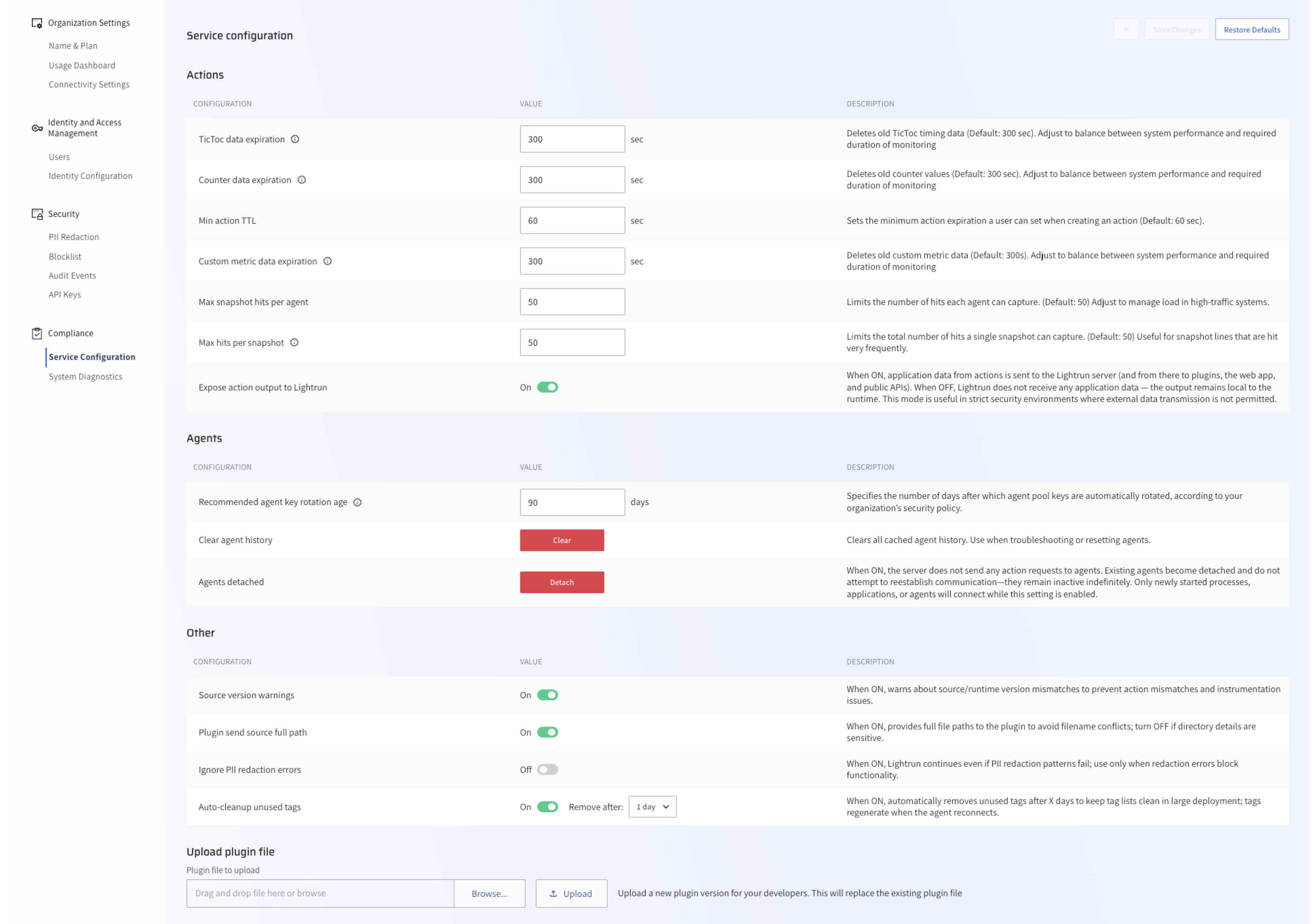
Service configuration parameters🔗
The following table describes the services and actions available on this page:
Action-related parameters🔗
| Parameter | Type/unit | Default | Description |
|---|---|---|---|
TicToc data expiration | Seconds | 300 | Deletes old TicToc timing data. Adjust to balance between system performance and required monitoring duration. |
Counter data expiration | Seconds | 300 | Deletes old counter values. Adjust to balance between system performance with the required duration of monitoring |
Min action TTL | Seconds | 60 | Sets the minimum action expiration time that a user define when creating an action. |
Custom metric data expiration | Seconds | 300 | Deletes old custom metric data. Adjust to balance between system performance with the required duration of monitoring. |
Max Snapshot Hits Per Agent | Hits | 50 | Sets the maximum number of hits per agent per action. Note: Supported from version 1.44. For more information, see Manage Snapshot Hit Counts. |
Max hits per snapshot | Hits | 50 | Limits the number of hits each agent can capture per snapshot. Adjust to manage load in high-traffic systems. Note: Supported from version 1.44. For more information, see Manage Snapshot Hit Counts. |
Expose action output to Lightrun | Toggle | On | When set to On, application data from actions is sent to the Lightrun server (and then to the plugins, the web app, and public APIs). When set to Off, Lightrun does not receive any application data—the output remains local to the runtime. This is useful in strict security environments where external data transmission is not permitted. |
Agent-related parameters🔗
| Parameter | Type/unit | Default | Description |
|---|---|---|---|
Recommended agent key rotation age | Days | 90 | Specifies the number of days after which agent pool keys are automatically rotated, according to your organization’s security policy. |
Clear Agent History | Clear button | Not selected | Clears all cached agent history. Use when troubleshooting or resetting agents. |
Agents Detached | Detach button | Not selected | When set to Detach, the server does not send any action requests to agents. Existing agents become detached and do not attempt to re-establish communication—they remain inactive indefinitely. Only newly started processes, applications, or agents will connect while this setting is enabled. |
Other parameters🔗
| Parameter | Type/unit | Default | Description |
|---|---|---|---|
Source version warnings | Toggle | On button | When set to On, warns about source/runtime version mismatches to prevent action mismatches and instrumentation issues. |
Plugin send source full path | Toggle | On | When set to On, sends full file paths to the plugin to avoid filename conflicts. Turn off if directory information is sensitive. |
Ignore PII redaction errors | Toggle | Off | When set to On, Lightrun continues operation even if PII redaction patterns fail. Use only when redaction errors block functionality. |
MCP access | Toggle | On | When set to On, users, personal access tokens, and API keys in your organization can access the Lightrun MCP server, subject to their existing permissions. When set to Off, MCP access is blocked for the organization, including access through OAuth, PAT, and API-key-based clients. Supported from version 1.86. |
Show Default Agent Pool in IDE | Toggle | On | When set to On, the Default Agent Pool appears in the IDE agent pool picker. When set to Off, the Default Agent Pool is hidden from JetBrains IDEs and Visual Studio Code only. The Management Portal and Agent Pool management pages are not affected. Supported from version 1.89. |
Hide agent setup from WebUI | Toggle | Off | When set to On, Lightrun hides agent setup flows in the Management Portal, including Getting Started > Set up an agent, the matching Get Started card, and the agent install step in onboarding. Direct navigation to those pages is redirected away from agent setup. Use this setting when your organization wants to keep agent keys out of developer-facing Web UI screens. When agent setup is hidden, obtain agent pool API keys from Settings > Identity and Access Management > Agent Pools. Supported from version 1.91. |
Auto-cleanup unused tags | Toggle and drop down | On | When set to On, automatically removes unused tags a configurable number of days to keep tag lists clean in large deployment. Tags are regenerated when the agent reconnects. Supported from version 1.74. |
| Upload plugin file | File upload | N/A | Allows on-premise Admins to provide a working IDE plugin version when developers cannot use the Lightrun plugin in their IDE, without requiring a Lightrun server upgrade. For more information, see Upload and distribute a Lightrun plugin independent of the server version. |
Important notes🔗
-
Starting from version 1.44,
Max Snapshot Counthas been replaced by:- Max Snapshot Hits Per Agent
- Max Snapshot Hits Per Snapshot
- When the
Recommended Agent Key Rotation Ageis exceeded, the agent key age is displayed in red.
- Disabling
Expose Action Output to Lightrunrestricts available action types to logs and metrics only.
- When
Hide agent setup from WebUIis enabled, users should retrieve agent pool API keys from Agent Pools instead of the Set up an agent experience.
Last update: September 14, 2026