
What is the Lightrun MCP?🔗
Lightrun MCP lets your AI coding assistant (Cursor, Gemini, Copilot, ChatGPT, and others) use Lightrun's runtime context on your behalf.
Built on the Model Context Protocol (MCP) standard, it can connect with most AI assistants and agents on the market.
Version availability
- OAuth (personal sign-in): Lightrun MCP with OAuth authentication is available starting Lightrun version 1.76.
- Personal access token: User-scoped PAT authentication is available starting Lightrun version 1.93.1.
- API key (Bearer token): API key authentication for Lightrun MCP is available starting Lightrun version 1.80.
- MCP access setting: Organization-level MCP access control is available starting Lightrun version 1.86.
- ChatGPT sign-in: ChatGPT can complete Client ID Metadata Document sign-in starting with Lightrun version 1.95.
Here's a short introduction video to Lightrun MCP:
Why use Lightrun MCP when you already use the IDE plugin?🔗
Lightrun MCP keeps the full power of the Lightrun IDE plugin while adding natural-language workflows and AI-driven runtime investigation.
All the Lightrun power - right where you code🔗
- Inspect expression values, call stacks, and code metrics in live runtimes.
- Production-safe, on-demand access to runtime data.
- No code changes. No rebuilds. No redeployments.
Less configuration. More conversation - in your native language🔗
- No forms, syntax, or variable names to remember.
Describe what you need in natural language, and the AI handles the rest.
- No need to remember agent pools, tags, or agent names.
Let the AI discover active services and recommend targets to you.
- Unsure which condition or expression to use?
The AI refines parameters iteratively until the desired result is reached — while you focus on coding.
AI-driven investigation and analysis🔗
- Runtime data often proves relevant in unexpected places. The AI suggests investigations, surfaces relevant use cases, and expands how you inspect your code.
- You don’t have to analyze the results manually.
It analyzes the results, validates hypotheses, and provides actionable recommendations.
Not convinced? Try it.🔗
The MCP quickstart guide walks you through a 4-step flow in about 6 minutes.
If you want your AI assistant to follow a structured runtime investigation workflow, see Lightrun AI Skills.
Lightrun MCP architecture🔗
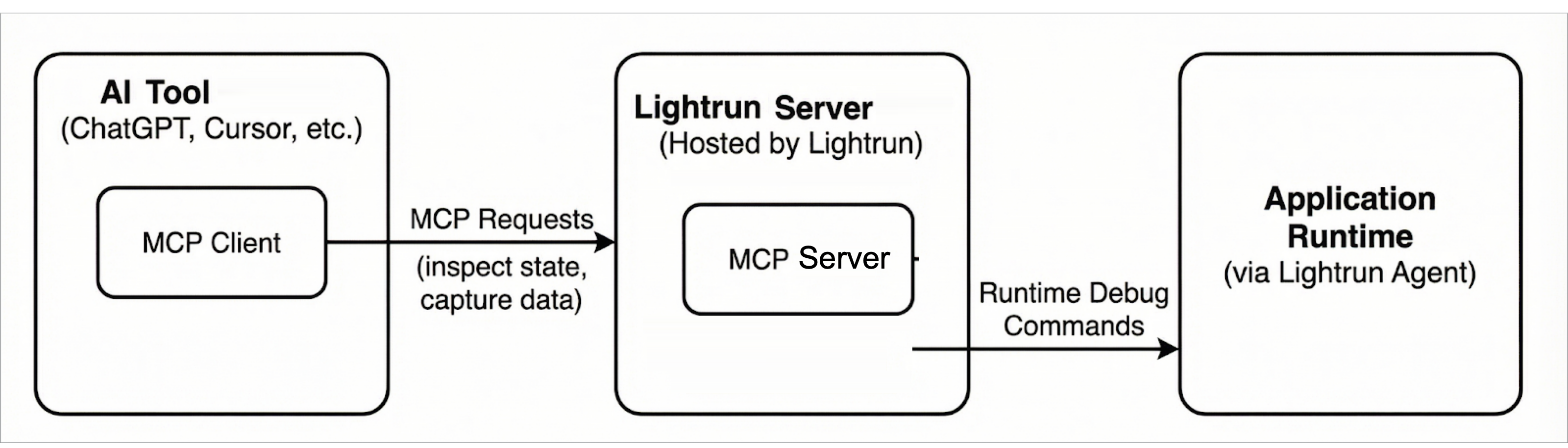
The Lightrun MCP architecture follows the standard MCP client–server model and consists of the following components:
MCP Client🔗
The MCP client is embedded in AI coding tools (such as Cursor). It issues MCP requests to inspect application state and request runtime data.
MCP Server (Lightrun MCP Server)🔗
The Lightrun MCP Server is a component of the Lightrun Server and implements the MCP interface, translating MCP requests into Lightrun API calls.
In this architecture, an AI coding tool acts as an MCP client and communicates with the Lightrun Server using MCP. The server mediates all interactions with the application runtime, ensuring that debugging and observability operations are executed safely and without requiring code changes or redeployments.
The following diagram shows the overall Lightrun MCP architecture and the interaction between MCP clients, the Lightrun Server, and the application runtime.
Security and privacy🔗
Data protection🔗
MCP results are subject to PII redaction based on your PII redaction configuration.
Authentication🔗
Authentication is required to access Lightrun MCP. You can connect using:
- OAuth for interactive sign-in as a Lightrun user.
- A user-owned personal access token (PAT) sent as a
Bearertoken. - A system API key sent as a
Bearertoken. API keys used for MCP must include the Dev API scope.
With OAuth or a PAT, the user must have a role that can access Lightrun MCP. PAT authentication uses the token owner's current RBAC permissions and Agent Pool access. Role or Agent Pool assignment changes take effect immediately for existing tokens. For the full prerequisite list, see the MCP quickstart.
Starting from Lightrun version 1.86, Company Admins can control organization-wide MCP availability with the MCP access setting in Service Configuration. When this setting is disabled, Lightrun blocks MCP access for the organization, including access through OAuth, PAT, and API-key-based clients.
Access is governed by Lightrun roles, API key scopes (where applicable), and existing permissions. Starting from Lightrun version 1.90, API-key clients also respect the key's Agent Pool Access configuration. A key restricted to specific pools discovers and performs actions only in those pools. Existing keys retain access to all agent pools.
Authorization is enforced on tool usage and not on the connection to the Lightrun MCP Server.
Choose OAuth, a PAT, or an API key🔗
| OAuth (personal) | PAT (personal) | API key (system) | |
|---|---|---|---|
| Best suited for | Interactive AI coding assistants where a developer can complete a browser sign-in | Personal MCP clients that support custom headers but cannot complete OAuth | Unattended automation, shared agents, custom services, and Public API clients |
| Identity | The signed-in Lightrun user | The token owner | The API key |
| Typical setup | MCP entry with URL only; the client opens a browser for sign-in and consent | MCP entry with Authorization: Bearer <PERSONAL_ACCESS_TOKEN> | MCP entry or SDK configuration with Authorization: Bearer <API_KEY> |
| Authorization | The user's current RBAC permissions and Agent Pool access | The user's current RBAC permissions and Agent Pool access | The key's scopes and Agent Pool Access configuration |
| Operational fit | Per-developer machines with browser access | Per-developer clients where interactive sign-in is unavailable or impractical | Servers, CI-style jobs, shared agents, and long-running integrations |
OAuth is the simplest option when the MCP client supports interactive sign-in. A PAT provides the same user-bound authorization model through a reusable secret. API keys fit system-like integrations that should not act as an individual user.
For configuration patterns, see the MCP quickstart guide.
Rules and limits🔗
The following rules and limits apply to the results returned to AI agents when using Lightrun MCP:
- A maximum of 50 runtime inspection hits is allowed per request. The default value is 1.
- Inspected objects are limited to a depth of three nesting levels.
- The default timeout is 60 seconds with a maximum timeout of 10 minutes.
- Quota limits can be bypassed only when an authorized user authenticated with OAuth or a PAT uses a supported per-request option, or when an API key was generated with Ignore the quota limits for the selected agent pools enabled.
Getting started🔗
To start using Lightrun MCP, read the following topics:
- MCP quickstart guide: Connect an AI assistant to Lightrun MCP and perform an initial runtime inspection.
- Personal access tokens: Generate, configure, and revoke a user-owned credential for MCP authentication.
- Lightrun MCP tools: Reference documentation for the tools exposed by Lightrun MCP.
- Live Runtime Debugging Skill: Guide an AI assistant through a deterministic runtime investigation with Lightrun MCP.
- Slow Execution Diagnosis Skill: Guide an AI assistant through a performance investigation of slow endpoints, timeouts, and hangs with Lightrun MCP.