
What is the Lightrun MCP?🔗
Lightrun MCP lets your AI coding assistant (Cursor, Gemini, Copilot, and others) use Lightrun's runtime context on your behalf.
Built on the Model Context Protocol (MCP) standard, it can connect with most AI assistants and agents on the market.
Version availability
- OAuth (personal sign-in): Lightrun MCP with OAuth authentication is available starting Lightrun version 1.76.
- API key (Bearer token): API key authentication for Lightrun MCP is available starting Lightrun version 1.80.
Here's a short introduction video to Lightrun MCP:
Why use Lightrun MCP when you already use the IDE plugin?🔗
Lightrun MCP keeps the full power of the Lightrun IDE plugin while adding natural-language workflows and AI-driven runtime investigation.
All the Lightrun power - right where you code🔗
- Inspect expression values, call stacks, and code metrics in live runtimes.
- Production-safe, on-demand access to runtime data.
- No code changes. No rebuilds. No redeployments.
Less configuration. More conversation - in your native language🔗
- No forms, syntax, or variable names to remember.
Describe what you need in natural language, and the AI handles the rest.
- No need to remember agent pools, tags, or agent names.
Let the AI discover active services and recommend targets to you.
- Unsure which condition or expression to use?
The AI refines parameters iteratively until the desired result is reached — while you focus on coding.
AI-driven investigation and analysis🔗
- Runtime data often proves relevant in unexpected places. The AI suggests investigations, surfaces relevant use cases, and expands how you inspect your code.
- You don’t have to analyze the results manually.
It analyzes the results, validates hypotheses, and provides actionable recommendations.
Not convinced? Try it.🔗
The MCP quickstart guide walks you through a 4-step flow in about 6 minutes.
Lightrun MCP architecture🔗
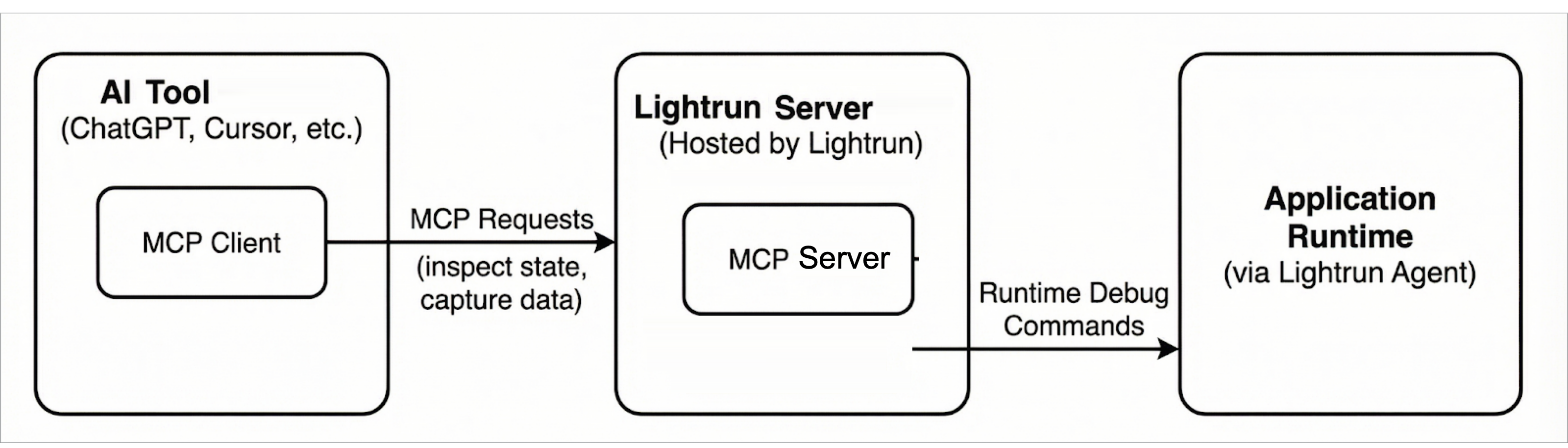
The Lightrun MCP architecture follows the standard MCP client–server model and consists of the following components:
MCP Client🔗
The MCP client is embedded in AI coding tools (such as Cursor). It issues MCP requests to inspect application state and request runtime data.
MCP Server (Lightrun MCP Server)🔗
The Lightrun MCP Server is a component of the Lightrun Server and implements the MCP interface, translating MCP requests into Lightrun API calls.
In this architecture, an AI coding tool acts as an MCP client and communicates with the Lightrun Server using MCP. The server mediates all interactions with the application runtime, ensuring that debugging and observability operations are executed safely and without requiring code changes or redeployments.
The following diagram shows the overall Lightrun MCP architecture and the interaction between MCP clients, the Lightrun Server, and the application runtime.
Security and privacy🔗
Data protection🔗
MCP results are subject to PII redaction based on your PII redaction configuration.
Authentication🔗
Authentication is required to access Lightrun MCP. You can connect using OAuth (interactive sign-in as a Lightrun user) or an API key sent as a Bearer token. API keys used for MCP must include the Dev API scope.
With OAuth, the user who signs in must have one of the Lightrun roles Developer, Company Admin, or Group Admin—the same roles that can access MCP setup in the Management Portal. For the full prerequisite list, see Step 1: Prerequisites in the quickstart.
Access is governed by Lightrun roles, API key scopes (where applicable), and existing permissions. Authorization is enforced on tool usage and not on the connection to the Lightrun MCP Server.
OAuth vs API key: what to use🔗
| OAuth (personal) | API key (system) | |
|---|---|---|
| Best suited for | Interactive AI coding assistants in the IDE (Cursor, Copilot, Claude Code, and similar) where a developer signs in once and works under their own Lightrun identity | Unattended automation: workflow tools (for example n8n), agent frameworks (LangChain, LlamaIndex), hosted or headless agents (for example OpenAI Agents, Claude Agents, OpenClaw), custom services, and any environment where a browser login is impractical |
| Identity | The signed-in Lightrun user | The API key |
| Typical setup | MCP entry with URL only; the client opens a browser for sign-in and consent | MCP entry or SDK configuration that sets Authorization: Bearer <API_KEY> (or equivalent headers) |
| Operational fit | Per-developer machines, short-lived sessions, human-in-the-loop debugging | Servers, CI-style jobs, shared agents, and long-running integrations where secrets are injected from a vault or environment |
OAuth gives you a straightforward path when each developer should act as themselves in Lightrun. API keys fit system-like integrations where you store a secret, rotate it on a schedule, and avoid interactive login on headless or shared infrastructure.
For configuration patterns, see the MCP quickstart guide.
Rules and limits🔗
The following rules and limits apply to the results returned to AI agents when using Lightrun MCP:
- A maximum of 50 runtime inspection hits is allowed per request. The default value is 1.
- Inspected objects are limited to a depth of three nesting levels.
- The default timeout is 60 seconds with a maximum timeout of 10 minutes.
- Quota limits cannot be ignored or bypassed.
Getting started🔗
To start using Lightrun MCP, read the following topics:
- MCP quickstart guide: Connect an AI assistant to Lightrun MCP and perform an initial runtime inspection.
- Lightrun MCP tools: Reference documentation for the tools exposed by Lightrun MCP.